Browse runtimes
The Runtimes page shows all the public runtime items plus the private runtime items that you own or have been shared with you. The list is on the left side of the page. At the top of the list is the number of runtime items.
For each runtime item, the colored identification icon, the name, the status, the number of API keys associated with published workflows and the number of published workflows are shown.
If the runtime item is private, a padlock icon is displayed over the colored icon.
The runtime status is represented by a colored dot, and the color of the dot corresponds to the status as follows:
| Color | Meaning |
|---|---|
| Gray | The runtime has never connected to the complete installation of EI-Flow. This could mean that the runtime has not been installed yet, has never been started, has not been configured correctly or there are network issues—for example firewall blocks—that are preventing the runtime from connecting. |
| Red | The runtime connected at least once to the complete installation of EI-Flow, but it's not communicating currently. This may mean that it has been turned off, is experimenting some issue or there is a networking problem. |
| Green | The runtime is communicating regularly with the complete installation of EI-Flow, so it is available for publishing, testing and unpublishing workflows. |
The list can be sorted and filtered.
The central part of the page shows general information about the selected runtime and the list of workflows that are currently published or have been published at least one time in the past inside the workflow.
General information includes:
-
Information coming from the runtime and pushed to EI-Flow:
- The version of the runtime software.
- The status of the runtime (see above).
- The status of the MCP server, if any.
- The basic URI, that is the first part of the URL of every API endpoint for the workflows published in the runtime.
-
The publication modes that the runtime supports, that is one of more between:
- Synchronous

- Asynchronous

- Autoscaling of asynchronous workflow

- Push notifications

- MCP server

- Synchronous
-
Core features of the runtime
 . They are software, hardware and network capabilities of the runtime.
A workflow is compatible with a runtime, and thus it can published inside it, only if the runtime has all the required core features.
For example, a block of the URL Converter processor needs access to the Web resource that it is required to download and process, so a workflow including that block can run only in a runtime that provides that network connectivity. The corresponding core fature is called internet-access. - The authentication mechanisms supported by the runtime for using workflows via their APIs. By default, runtimes support authentication through API keys, but alternative or additional mechanisms can be implemented on demand.
-
Information of the runtime item, stored in EI-Flow:
- The owner of the runtime item.
The list of workflows is divided into two tabs:
- Published workflows: workflows that are currently published.
- Unpublished workflows: workflows that were previously published but are not currently published.
Note
Only workflows accessible to you are shown; there can be other workflows that are invisible to you and are published inside the runtime.
The following information is shown for each workflow:
- Name
- Any icon indicating a workflow that is an MCP tool
- Version
- Number of blocks1
- CPU usage1
- Memory usage1
- API keys
- Publication date and time
- Publication author
- Publication status
The lists can be sorted and filtered.
The right part of the page lists possible operations on the selected runtime item and other properties:
-
Properties of the runtime that are communicated to EI-Flow:
-
Runtime capacity in terms of CPU, memory, number of workflows and number of JavaScript Interpreter v. 1.0.0 blocks, divided in two panels:
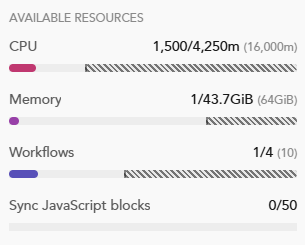
AVAILABLE RESOURCES, with the following indicated for each dimension:
- Number to the left of the slash and left-aligned dark bar: amount occupied by workflows accessible to you that are published in the runtime.
- Number to the right of the slash: total amount currently available to publish workflows. If not followed by another number in parentheses, it coincides with the configured limit of the runtime.
- Number in parentheses, if any: displayed only if there are published workflows that are not accessible to you. It is the configured limit of the runtime.
-
Right-aligned diagonally dashed bar, if any: displayed only if there are published workflows that are not accessible to you. It is the amount occupied by published workflows not accessible to you.
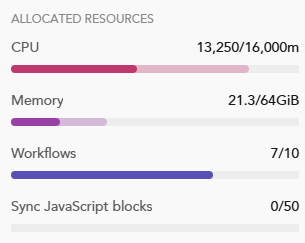
ALLOCATED RESOURCES, with the following indicated for each dimension:
- Number to the left of the slash and sum of the colored bars: amount occupied by workflows published in the runtime.
The darker bar represents replicas of workflow blocks that are running, while the lighter bar represents replicas of autoscaling asynchronous workflows that are currently scaled down. -
Number to the right of the slash: the configured limit of the runtime.
-
-
Properties of the runtime item, stored in EI-Flow:
- The optional description of the runtime.